
Python variables are the reserved memory locations used to store values with in a Python Program. This means that when you create a variable you reserve some space in the memory.
Based on the data type of a variable, memory space is allocated to it. Therefore, by assigning different data types to Python variables, you can store integers, decimals or characters in these variables.
Memory Addresses
Data items belonging to different data types are stored in computer's memory. Computer's memory locations are having a number or address, internally represented in binary form. Data is also stored in binary form as the computer works on the principle of binary representation. In the following diagram, a string May and a number 18 is shown as stored in memory locations.
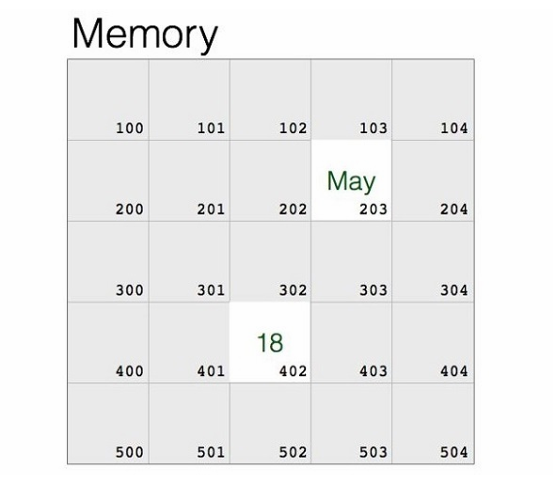
If you know the assembly language, you will covert these data items and the memory address, and give a machine language instruction. However, it is not easy for everybody. Language translator such as Python interpreter performs this type of conversion. It stores the object in a randomly chosen memory location. Python's built-in id() function returns the address where the object is stored.
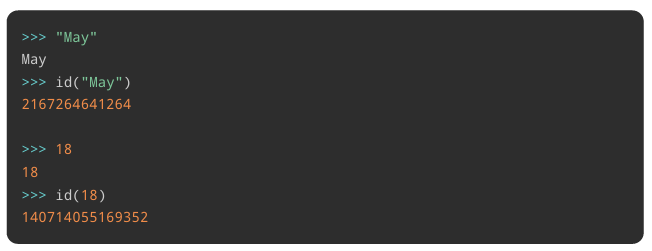
Once the data is stored in the memory, it should be accessed repeatedly for performing a certain process. Obviously, fetching the data from its ID is cumbersome. High level languages like Python make it possible to give a suitable alias or a label to refer to the memory location.
In the above example, let us label the location of May as month, and location in which 18 is stored as age. Python uses the assignment operator (=) to bind an object with the label.

The data object (May) and its name (month) have the same id(). The id() of 18 and age are also same.
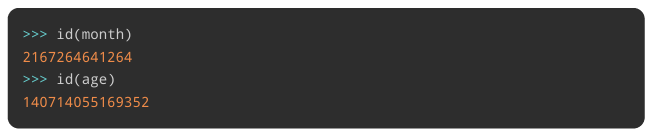
The label is an identifier. It is usually called as a variable. A Python variable is a symbolic name that is a reference or pointer to an object.
Creating Python Variables
Python variables do not need explicit declaration to reserve memory space or you can say to create a variable. A Python variable is created automatically when you assign a value to it. The equal sign (=) is used to assign values to variables.
The operand to the left of the = operator is the name of the variable and the operand to the right of the = operator is the value stored in the variable. For example:
Example
This example creates different types (an integer, a float, and a string) of variables.
    counter = 100       # Creates an integer variable
    miles = 1000.0      # Creates a floating variable
    name = "Zara Ali"   # Creates a string variable
Printing Python Variables
Once we create a Python variable and assign a value to it, we can print it using
print() function.
Following is the extension of previous example and shows how to print different variables in Python:
Example
This example creates different types (an integer, a float, and a string) of variables.
    counter = 100       # Creates an integer variable
    miles = 1000.0      # Creates a floating variable
    name = "Zara Ali"   # Creates a string variable


    print(counter)
    print(miles)
    print(name)
Here, 100, 1000.0 and "Zara Ali" are the values assigned to counter, miles, and name variables, respectively. When running the above Python program, this produces the following result:
100
1000.0
Zara Ali
Deleting Python Variables
You can delete the reference to a number object by using the del statement. The syntax of the del statement is:
del var1[,var2[,var3[....,varN]]]]You can delete a single object or multiple objects by using the del statement. For example:
  del var
  del var_a, var_b
Example
Following examples shows how we can delete a variable and if we try to use a deleted variable then Python interpreter will throw an error:
  counter = 100
  print (counter)

  del counter
  print (counter)
This will produce the following result:
 100
 Traceback (most recent call last):
  File "main.py", line 7, in < module >
    print (counter)
 NameError: name 'counter' is not defined
Getting The Type of a Variable
You can get the data type of a Python variable using the python built-in function type() as follows.
Example
    x = "Zara"
    y = 10
    z = 10.10

    print(type(x))
    print(type(y))
    print(type(z))
This will produce the following result:
 < class 'str' >
 < class 'int' >
 < class 'float' >
Casting Python Variables
You can specify the data type of a variable with the help of casting as follows:
Example
This example demonstrates case sensitivity of variables.
    x = str(10)    # x will be '10'
    y = int(10)    # y will be 10
    z = float(10)  # z will be 10.0

    print( "x =", x )
    print( "y =", y )
    print( "z =", z )
This will produce the following result:
  x = 10
  y = 10
  z = 10.0
Case-Sensitivity of Python Variables
Python variables are case sensitive which means Age and age are two different variables:
  age = 20
  Age = 30

  print("age =", age)
  print("Age =", Age)
This will produce the following result:
  age = 20
  Age = 30
Python Variables - Multiple Assignment
Python allows to initialize more than one variables in a single statement. In the following case, three variables have same value.
    >>> a=10
    >>> b=10
    >>> c=10
Instead of separate assignments, you can do it in a single assignment statement as follows:
  >>> a=b=c=10
  >>> print (a,b,c)
  10 10 10
In the following case, we have three variables with different values.
  >>> a=10
  >>> b=20
  >>> c=30
These separate assignment statements can be combined in one. You need to give comma separated variable names on left, and comma separated values on the right of = operator.
    >>> a,b,c = 10,20,30
    >>> print (a,b,c)
    10 20 30
Let's try few examples in script mode:
    a = b = c = 100

    print (a)
    print (b)
    print (c)
This produces the following result:
    100
    100
    100
Here, an integer object is created with the value 1, and all three variables are assigned to the same memory location. You can also assign multiple objects to multiple variables. For example:
  a, b, c = 1, 2, "Zara Ali"

  print(a)
  print(b)
  print(c)
This produces the following result:
  1
  2
  Zara alia
Here, two integer objects with values 1 and 2 are assigned to variables a and b respectively, and one string object with the value "Zara Ali" is assigned to the variable c.
Python Variables - Naming Convention
Every Python variable should have a unique name like a, b, c. A variable name can be meaningful like color, age, name etc. There are certain rules which should be taken care while naming a Python variable:
- A variable name must start with a letter or the underscore character.
- A variable name cannot start with a number or any special character like $, (, * % etc.
- A variable name can only contain alpha-numeric characters and underscores (A-z, 0-9, and _ )
- Python variable names are case-sensitive which means Name and NAME are two different variables in Python.
- Python reserved keywords cannot be used naming the variable.
If the name of variable contains multiple words, we should use these naming patterns:
- Camel case - First letter is a lowercase, but first letter of each subsequent word is in uppercase. For example: kmPerHour, pricePerLitre
- Pascal case - First letter of each word is in uppercase. For example: KmPerHour, PricePerLitre
- Snake case - Use single underscore (_) character to separate words. For example: km_per_hour, price_per_litre
Example
Following are valid Python variable names:
    counter = 100
    _count = 100
    name1 = "Zara"
    name2 = "Nuha"
    Age = 20
    zara_salary = 100000

    print (counter)
    print (_count)
    print (name1)
    print (name2)
    print (Age)
    print (zara_salary)
This will produce the following result:
  100
  100
  Zara
  Nuha
  20
  100000
Example
Following are invalid Python variable names:
    1counter = 100
    $_count  = 100
    zara-salary = 100000

    print (1counter)
    print ($count)
    print (zara-salary)
This will produce the following result:
    File "main.py", line 3
        1counter = 100
              ^
    SyntaxError: invalid syntax
Example
Once you use a variable to identify a data object, it can be used repeatedly without its id() value. Here, we have a variables height and width of a rectangle. We can compute the area and perimeter with these variables.
  >>> width=10
  >>> height=20
  >>> area=width*height
  >>> area
  200
  >>> perimeter=2*(width+height)
  >>> perimeter
  60
Use of variables is especially advantageous when writing scripts or programs. Following script also uses the above variables.
#! /usr/bin/python3

 width = 10
 height = 20
 area = width*height
 perimeter = 2*(width+height)
 print ("Area = ", area)
 print ("Perimeter = ", perimeter)
Save the above script with .py extension and execute from command-line. The result would be:
  Area = 200
  Perimeter = 60
Python Local Variables
Python Local Variables are defined inside a function. We can not access variable outside the function.
A Python function is a piece of reusable code and you will learn more about functions in Python - Functions tutorial.
Example
Following is an example to show the usage of local variables:
      def sum(x,y):
        sum = x + y
        return sum
      print(sum(5, 10))
This will produce the following result:
15Python Global Variables
Any variable created outside a function can be accessed within any function and so they have global scope.
Example
Following is an example to show the usage of local variables:
      x = 5
      y = 10
      def sum():
        sum = x + y
        return sum
      print(sum())
This will produce the following result:
15Constants in Python
Python doesn't have any formally defined constants, However you can indicate a variable to be treated as a constant by using all-caps names with underscores. For example, the name PI_VALUE indicates that you don't want the variable redefined or changed in any way.
The naming convention using all-caps is sometimes referred to as screaming snake case where the all-caps (screaming) and the underscores (snakes).